Top 5 Budget-Friendly Video Editing Software for Beginners
For those just starting their journey in video editing, finding the right software that won’t break the bank is crucial. Here are the Top 5 Budget-Friendly Video Editing Software for Beginners that offer a great balance of features and affordability:
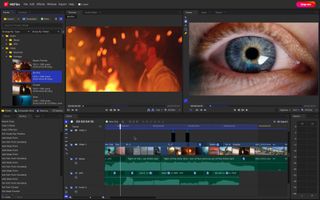
- HitFilm Express: This powerful software combines both editing and visual effects, making it a popular choice among beginners. It is exceptionally user-friendly, providing a straightforward interface along with comprehensive tutorials.
- OpenShot: A free, open-source option that’s perfect for beginners. With a simple drag-and-drop interface, OpenShot allows users to create stunning videos without getting overwhelmed by complex features.
- DaVinci Resolve: Known for its professional-grade color correction, this software also offers robust editing capabilities. The free version is incredibly rich in features, suitable for those looking to elevate their editing skills.
- VideoPad: This user-friendly software is great for beginners wanting to create videos quickly. Its intuitive layout and various effects make it a solid choice for budget-conscious editors.
- iMovie: For Mac users, iMovie is a free tool that provides essential editing features packed into an accessible platform, perfect for creating professional-looking videos effortlessly.
Is Free Video Editing Software Worth the Hype?
In recent years, the demand for video content has skyrocketed, making it essential for creators to have access to effective editing tools. This raises the question: Is free video editing software worth the hype? While free software can provide basic functionalities, users often find themselves limited in terms of features and capabilities. For beginners or those producing simple content, these tools can be a great starting point. Programs like HitFilm Express and DaVinci Resolve offer impressive features that rival some paid options, enabling creators to craft visually appealing videos without breaking the bank.
However, as projects grow in complexity and demand for higher quality increases, many users may discover that free versions lack essential features such as advanced color grading, audio tools, and export options. Additionally, free video editing software often comes with watermarks, limited access to stock content, and slower rendering times. Ultimately, while these tools can be beneficial for those just starting out or on a tight budget, serious video creators might find it necessary to invest in paid software for a more comprehensive editing experience. The hype may be justified for entry-level use, but the long-term benefits of professional software could outweigh the initial cost.
How to Choose the Best Affordable Video Editing Software for Your Needs
Choosing the best affordable video editing software involves understanding your specific needs and budget. First, identify the primary purpose for which you need the software, such as creating social media content, YouTube videos, or professional projects. Research features like user interface, supported file formats, and available tools for editing, effects, and audio management. Make a list of your top priorities, as this will help you narrow down your options effectively.
Next, consider your level of expertise. If you are a beginner, look for software that offers a user-friendly interface along with helpful tutorials. For more advanced users, explore options that provide advanced features at an affordable price. Additionally, read reviews from current users to gauge their satisfaction and any common issues faced. Ultimately, the right choice will be one that meets your needs without breaking the bank, allowing you to create engaging content effortlessly.